A free Software utilities program for Windows
OverDisk is a free Windows program, belonging to the category Software utilities with subcategory Disk (more specifically Disk Analysis) and has been created by Elias Fotinis.
It's available for users with the operating system Windows 98 and previous versions, and you can get it only in English. The current version of the program is 0.11 Beta and its last update on 8/26/2005.
Since the program has been added to our selection of programs and apps in 2004, it has already reached 80.942 installations, and last week it achieved 41 downloads.
About the download, OverDisk is a fairly light program that doesn't need as much storage space than many programs in the section Software utilities. It's a program frequently downloaded in many countries such as United States, Australia, Taiwan, and Province Of China.

























User reviews about OverDisk
by Anonymous
Original way to analyze your drive.
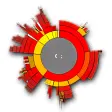
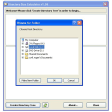
Overdisk is essentially limited to creating an image of the space taken up by different folders and drives on your PC. The program analyzes your PC quickly and generates a cool image. You rollover it to check the details. You can even generate statistics and reports and use the explorer type window to look into files.After a while though, I think that the view is a bit confusing. You can't really tell from a first glance what is taking up what space.
Pros:
Cool pie view and roll over details
Quick
Drop down explorer window
Get statistics and info
Cons:
Confusing after a while More